Create Your Own Font on the iPad: A Hands-On Guide
Have you ever scrolled through a font library, searching for that perfect typeface that feels uniquely yours, only to settle for something that’s almost right? That feeling of compromise is common among designers, entrepreneurs, and creators. Your brand’s voice has a specific tone, and the typography you choose is its visual accent. What if you could capture the exact personality you want by starting with your own handwriting? That’s the promise of creating a custom font directly on your iPad, a process that’s now more accessible and intuitive than ever.
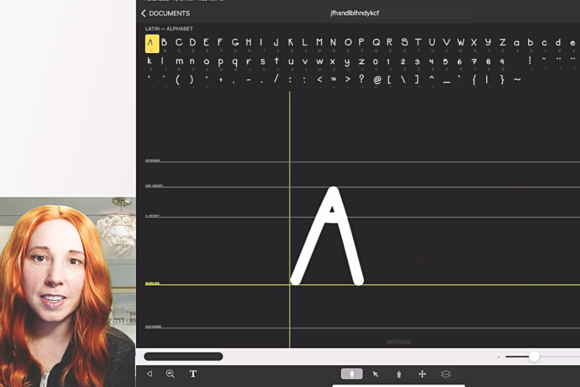
This approach to modern typography puts the creative power back in your hands. Using a tool like iFontMaker, you’re not just selecting a pre-made design asset; you’re crafting one. The process involves drawing each character—the entire glyph set—on your tablet’s screen. This means the final typeface carries the authentic, imperfect charm of your personal script, a quality that’s incredibly difficult to replicate with standard premium fonts. It’s a bridge between the warmth of handwritten notes and the scalability of digital text, resulting in a truly personal creative font.
From Personal Touch to Professional Branding
The applications for a custom handwritten font are vast, spanning both personal and commercial projects. For a small business owner, this isn’t just a fun experiment—it’s a strategic branding move. Imagine using a font derived from your own signature on your logo design. It instantly communicates authenticity and personal investment. This same typeface can then flow through your entire brand identity: your packaging design, website headers, social media graphics, and thank-you cards included with orders. The visual consistency this creates is powerful, helping customers recognize your brand across every touchpoint.
Content creators and bloggers face a constant battle for audience engagement. A unique script font or sans serif font with a personal flair can make your graphics stand out in a crowded feed. It adds a layer of personality that stock fonts often lack, making your digital products—like printable planners, e-books, or online course materials—feel more bespoke and valuable. For marketing professionals, a custom display font can become a key component of a campaign, used on posters, merchandise, and editorial layouts to create a cohesive and memorable visual story.
Even for hobbyists and crafters, the value is immense. Think about designing custom wedding invitations, family recipe books, or personalized stationery. Using a font you created yourself adds an irreplaceable sentimental and professional presentation layer. The key is to view this not just as making a font, but as developing a versatile design asset tailored to your specific goals.
Practical Advice for Your First Custom Typeface
Jumping into font creation is exciting, but a little planning goes a long way. Before you start drawing glyphs in iFontMaker, consider the personality you want to convey. Is it a playful, bouncy script font for a children’s brand? Or a clean, structured handwritten font for a modern lifestyle blog? Your intended use should guide your style. A font meant for body text on a website needs superior readability at small sizes, prioritizing clear letterforms and good spacing. A font for logos or headlines can be more stylized and expressive.
Think about font pairings from the outset. Your custom creation likely won’t be used for every single piece of text. A common and effective strategy is to pair your handwritten font with a neutral, highly readable serif font or sans serif font for longer paragraphs. This creates a beautiful hierarchy: your personal font grabs attention for headlines, subheads, or pull quotes, while the companion font ensures comfortable reading for body copy. Test these pairings early in your design process to see how they interact visually.
Pay close attention to readability. On the iPad, it’s easy to draw beautiful, flowing letters, but you must also create clear distinctions between characters. For instance, ensure your lowercase ‘l’, uppercase ‘I’, and the number ‘1’ are easily distinguishable. The same goes for ‘a’ and ‘o’, or ‘h’ and ‘n’. The editing tools in apps like iFontMaker allow you to refine each glyph, adjust spacing (the space between individual letters), and kerning (the space between specific letter pairs) to achieve a professional, polished result. This step is what separates a rough sketch from a functional typeface.
Leveraging Your Font Across Projects
Once you’ve created and exported your font file, the real fun begins. Integrate it into your workflow. Use it for your next set of social media graphics to create a signature look for your Instagram stories or Pinterest pins. Apply it to your website’s hero section for an impactful first impression. In packaging design, a custom font can make your product feel artisanal and thoughtfully crafted.
For those planning to use their font commercially, it’s crucial to understand the licensing. Since you created it, you typically own the rights to use it for your own projects. However, if you plan to sell the font itself or use it in client work for a fee, you should clarify the terms. Many creation tools grant you a commercial license for the fonts you make, but it’s always best practice to review the specific agreement. This ensures your beautiful new asset is also a legally sound one.
The process of creating your own font on the iPad demystifies typography and gives you a profound appreciation for type design. It moves you from being a passive consumer of fonts to an active creator, equipped with a unique tool to express your brand’s voice, enhance your projects, and engage your audience on a more personal level. It’s a practical skill that yields a tangible, stylish asset you can use for years to come.